












































Digital data is a critical part of small businesses’ operations. From customer information to financial records, contracts to invoices, and project files, quick and accurate data access is crucial for today’s businesses. However, many organizations don’t think about data protection, until it becomes a challenge.
A single incident or failure of the storage device or system could halt productivity efforts in its tracks. Many business owners focus on growing their business, marketing, and attracting customers, but they never think about it as data loss is always a threat that can affect their business significantly. Knowing how to quickly retrieve lost data with file recovery software for PC and the cost of data loss can help reduce disruptions and help your small business stay running.
The Real Impact of Data Loss on Small Businesses
Data loss has much wider implications than loss of files. If vital business data becomes unreachable, business functions can come to a standstill.
Key Impacts of Data Loss
- Wasted time by employees in copying and filing files and records for hours and hours.
- Failure to meet deadlines and delays to projects and client delivery.
- Loss of revenue from interruption of operations.
- Loss of customer trust and business reputation.
Why Data Loss Matters More Than Missing Files
The bottom line is that the value of data loss can be much greater than the value of the files lost. It impacts productivity, profitability, customer satisfaction, and overall business performance.
Common Causes of Business Data Loss
Many business owners think that data loss only happens during disasters, but it’s usually the everyday incidents.
Windows Crashes and Update Failures
Occasionally, files are not accessible or unexpected system problems can arise because of Windows crashes or update problems. Updates are essential for security and performance, but they might sometimes fail and cause data loss.
Drive Formatting Errors
Another frequent problem is drive formatting errors. A user might have accidentally formatted the wrong drive or partition while handling the storage devices, and important files vanish into thin air.
Accidental File Deletion
Data loss continues to be one of the top reasons for accidental data deletion. Employees might not realize that important documents are being moved away and then find them later missing from the Recycle Bin.
Hard Drive and SSD Failures
There are also hardware failures that can pose significant problems. Hard drives or SSDs can fail unexpectedly due to age, overheating, physical damage, or manufacturing fault. In such instances, critical information that could prove vital for a business may disappear in seconds.
Can Lost Files Be Recovered?
Fortunately, this is not always the case when your files are lost. In most instances, file recovery software will be able to help you with the recovery of important data for PC before it is overwritten.
How RecoverGo Windows Can Help Recover Important Files
In the event of data loss, swift action is crucial. Businesses need a good recovery solution to recover critical files and minimize downtime.
Recover Deleted, Formatted, and Lost Files
iToolab RecoverGo Windows Data Recovery is designed to retrieve lost files from Windows computers and storage devices, including hard drives, USB flash drives, and external drives. It provides a practical solution for recovering files that have been accidentally deleted, lost due to system crashes, or affected by formatting errors.
Support for Multiple Business File Types
It handles all kinds of files such as documents, spreadsheets, photos, videos, presentations, and other business-critical data. This versatility is helpful for organizations that have to deal with various forms of digital content daily.
User-Friendly Recovery Process
It is very simple—one of its main advantages. Many small business owners and employees are not technically savvy, so complex recovery processes are hard to handle. RecoverGo has a simple recovery procedure, making it ideal for non-technical users.
Reducing Downtime After Data Loss
A solution that can scan storage devices for recoverable data can also help businesses recover files in case of factory reset PC scenarios. Access to reliable Windows data recovery software can minimize downtime and assist organizations in quickly getting back on their feet.
How to Recover Lost Files with RecoverGo
RecoverGo can recover your files in just a matter of minutes. Here are some basic things you can do to get started on your recovery:
Step 1: Download and Install RecoverGo
Download and install iToolab RecoverGo Windows Data Recovery to your PC. Note: If you have lost files in the same partition, you should install it on another drive or partition so that you won’t overwrite anything that might be recoverable.
Step 2: Select a Location to Scan
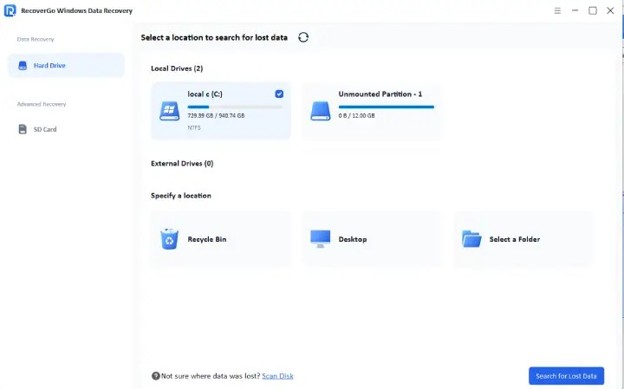
After launching RecoverGo, you will see the list of drives and storage locations on your computer, including the local drives, external drives and Recycle Bin.
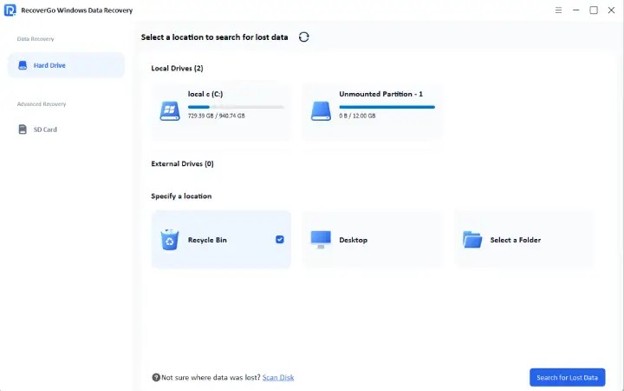
Choose the drive or folder your files were last known to be on, and then click on the “Search for Lost Data” button to search.
Step 3: Scan and Preview Results
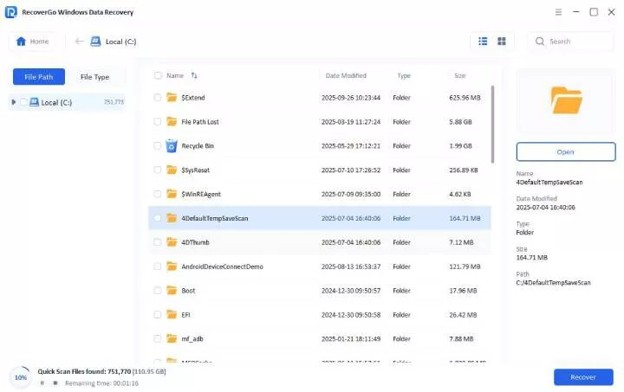
RecoverGo will do both quick scan and deep scan to recover as many files as possible.
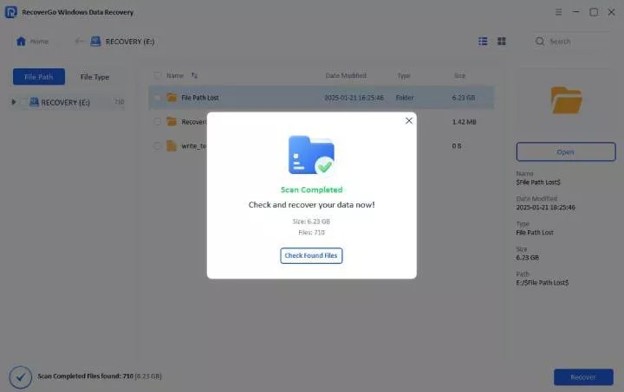
After the scan is done, you will be able to filter the results by file type (photo, document, video etc.) and search by file name. To be certain that a file contains what you need, click the “Preview” button on any file prior to recovery.
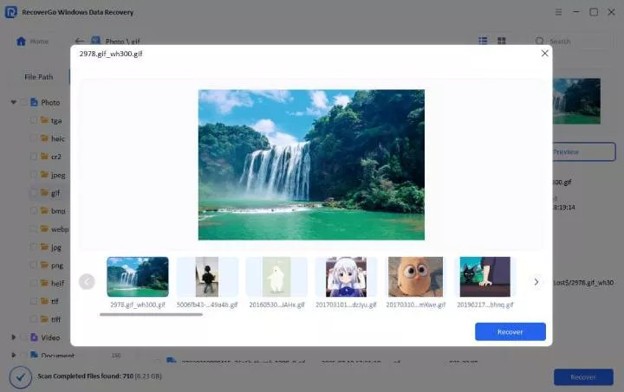
Step 4: Recover Your Files
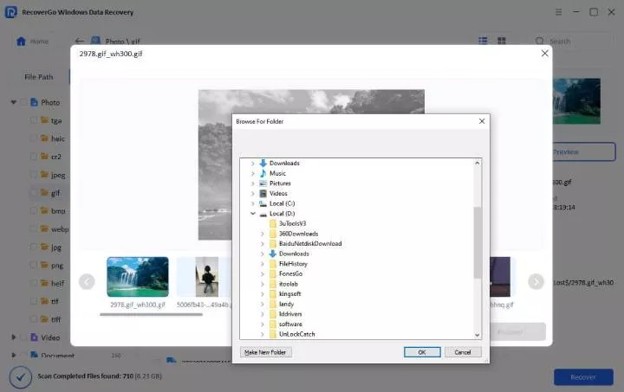
Choose the files you wish to recover, click on “Recover” button and then select an appropriate safe destination folder on another drive to save the files.
Your files will be restored and available in no time. Clicking on Check Recovered Data will immediately check the results.
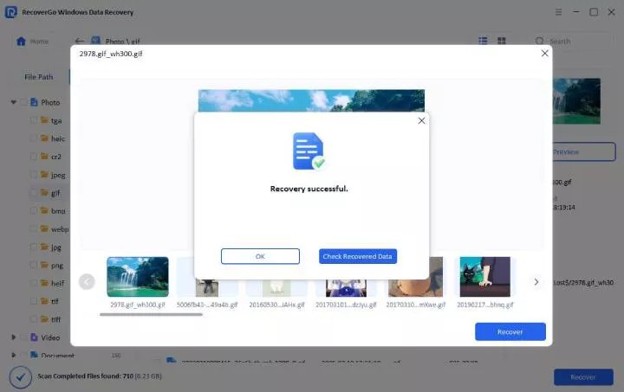
Businesses can better protect their valuable information with iToolab RecoverGo Windows Data Recovery and reduce the interference of business operations.
Protecting Your Small Business from Future Data Loss

Tools for recovery are helpful, but prevention is always the best option. There are a number of best practices that business owners can follow to limit risk:
- Make regular backups of important files.
- Utilize cloud storage and other external backup devices.
- Keep an eye on storage drives’ health.
- Maintain a trustworthy recovery solution at hand.
Frequent backups provide a valuable risk mitigation strategy. Having multiple copies of important information means that files will still be available if the devices that hold them fail.
Having multiple storage options, such as cloud storage and external drives, also helps to prevent relying on one source of storage. Using both methods provides a more robust backup approach.
It’s also vital to keep an eye on the health of storage devices. Proactively replacing aging drives before they fail can avoid potentially costly interruptions and safeguard critical business data.
Conclusion
Data is one of the biggest assets to any small business. Important files can be lost, and this can lead to loss of productivity, delays, financial losses, and damage to customer relationships. Entrepreneurs can reduce interruptions, swiftly retrieve crucial information, and continue their operations normally in the event of unintended data loss by implementing robust backup strategies and using reliable file recovery software for PC such as RecoverGo.
Find a Home-Based Business to Start-Up >>> Hundreds of Business Listings.