









































A single copyright claim can wipe out weeks of content work. We see this happen to small business owners, freelancers, and content marketing teams who publish AI-generated content – text, images, video, and audio – without a review of the commercial rules first.
In this article, we show you which rights apply to each content type, which tools grant clean commercial licenses, and how we run the generate-humanize-verify workflow before anything goes live.
Why AI-Generated Content Does Not Come With Automatic Commercial Rights
Most people who use AI for content creation assume that a prompt alone gives them ownership of the output. That assumption fails in three distinct ways, and each failure carries a different type of commercial risk.
First, ownership. In the United States, the Copyright Office does not grant copyright to works that lack human authorship. A prompt alone does not satisfy that threshold. The same rule applies across the EU, UK, and most of the Asia-Pacific region. Without copyright protection, any competitor can legally copy, resell, or redistribute your AI-generated content, and you have no statutory recourse as the content owner.
Second, training data. The models behind tools like Midjourney, ChatGPT, and Stable Diffusion train on billions of web pages, images, and documents, much of it scraped without explicit permission from the original creators. When a model reproduces a pattern, phrase, or visual style closely enough to match a protected source, the publisher of that content faces an infringement claim even without manual copying. Several such lawsuits are active in U.S. federal courts as of 2025 – the New York Times alone filed two separate actions against AI companies – and their outcomes will shape commercial AI use for years. Built In tracks every major case and ruling in plain language, and is one of the clearest public-facing references on what is and is not settled law for content publishers right now.
Third, the tool’s terms of service. Each AI platform sets its own rules on commercial use. Some grant full rights on paid plans. Others restrict commercial use entirely, require attribution, or retain a license to use your output for model training. These terms change, and what was permitted last year may not be permitted today. Every online tool in this space operates under its own license – there is no single standard.
With that legal foundation in place, we look at how to build a safe workflow. Text comes first because it drives most AI-generated content budgets – and because the text workflow feeds directly into every other content type covered below.
KEY TAKEAWAY:
Ownership of AI content is contractual – it comes from the tool’s terms of service, not from copyright law. Check the terms for your specific plan before you publish anything commercially.
How to Use AI for Text Content Creation and Keep It Commercially Safe
Text is where most content teams start with AI, and it is where the workflow matters most. Raw AI output carries two problems: it may contain patterns that detection tools flag as machine-generated, and it may closely mirror phrasing from the model’s training data. Both problems are solvable if you pick the right tool first and follow the three-step process below.
Text Generation Tools and What Each One Grants You
Before you generate a single word for a client or commercial project, confirm what commercial rights the tool gives you and whether it addresses AI detection at the source. Here is how the three most common options compare:
- ChatGPT (OpenAI). OpenAI grants full commercial rights to text generated through ChatGPT Plus, Pro, and the API. The free tier currently also permits commercial use under OpenAI’s Terms of Use, but these terms can change – always verify the current policy directly before any commercial project. ChatGPT does not humanize output at the generation stage. Raw text consistently carries detectable AI patterns and requires a separate humanization pass before delivery to publishers or clients who run detection checks.
- Jasper grants commercial rights to output on all paid plans; there is no free tier with commercial use. It includes tone-adjustment tools aimed at brand voice, but these do not address AI detection patterns. Output still requires humanization before submission to any client or platform that runs detection tools.
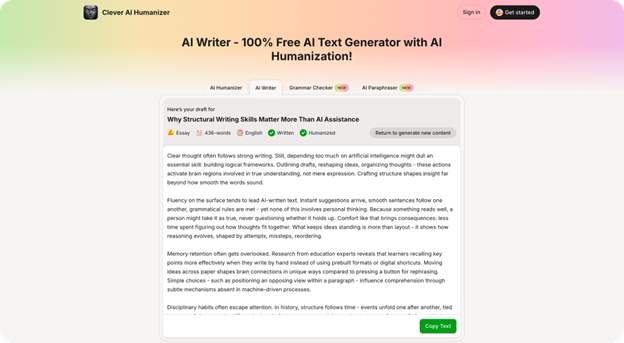
- Clever AI Writer. Commercial rights are granted on all plans, including the free tier. You can humanize AI content for free without a paid subscription. The key difference from the tools above is that the AI Writer produces content that is humanized at the generation stage – the output already passes detection tools without a separate humanization step. This compresses the workflow from three steps to one for clean, straightforward drafts.
| Tool | Commercial rights | Humanization built in | Free tier | Detection risk |
| ChatGPT (paid + free tier) | Yes | No | Yes | High |
| Jasper (paid plans only) | Yes | No | No | High |
| AI Writer | Yes (all plans) | Yes | Yes | Low |
As the table shows, ChatGPT and Jasper cover the right questions but leave AI detection entirely to you. CleverHumanizer takes a different approach – the AI Writer, The Best Humanizer, and the Paraphraser work as a single ecosystem: one tool generates the draft commercially clean, the second removes AI detection patterns, and the third resolves any sourcing risk before delivery. The three steps below follow that sequence exactly.
Step 1. Generate With a Tool That Grants Commercial Rights
Start with the free text generator with AI humanization at Clever AI Humanizer – it gives you commercial rights and human-readable output in a single step. If you already use ChatGPT or Jasper, they are commercially safe on paid plans, but you will still need Steps 2 and 3 before any delivery.
Step 2. Humanize to Make AI Content Undetectable Before You Publish
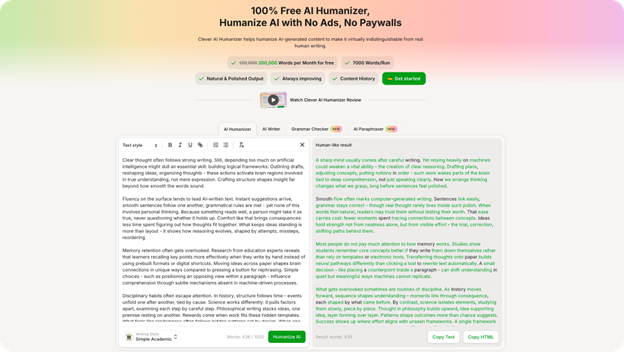
AI detection tools scan for statistical patterns that models consistently produce: uniform sentence length, predictable word transitions, and low lexical variety. Publishers, ad platforms, and clients increasingly run submissions through detectors such as GPTZero or Originality.ai. GPTZero, for example, flags text above roughly 80% predicted AI probability as high-risk – most clients who run checks treat anything above 20% as grounds for rejection.
Humanization rewrites the text to break those patterns. It varies sentence length, introduces idiomatic word choices, and shifts the rhythm of the prose to match natural human writing. The distinction from paraphrase work matters here – humanization targets AI detection patterns, while a paraphrase pass adjusts meaning or tone.
The Best Humanizer at Clever AI Humanizer is the tool for this step. Feed it the full draft or any flagged section, and it will make your AI writing undetectable without touching the meaning – the output passes major detection tools and reads as natural human prose.
For content marketing work where a client will test the submission, this step is non-negotiable. Run the humanizer output through your target detector before delivery. If the score still reads above your threshold, run the tool a second time on the flagged segments.
Step 3. Paraphrase to Resolve Sourcing Risk
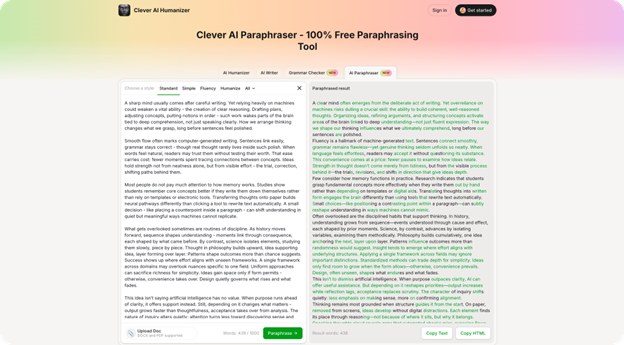
Even after humanization, some passages may sit too close to a known source in the model’s training data. A plagiarism checker can surface these. When a passage flags, you need a rewrite that shifts both phrasing and structure, not just synonym substitution.
The paraphrase a sentence or an article tool at Clever AI Humanizer handles both granularities. Paste a single sentence to rewrite a specific phrase, or paste the full article to process it as a whole. Use this step any time a client returns flagged content or a plagiarism tool reports a match.
Text is only one content type, and in many campaigns, it sits alongside AI-generated photos and graphics. Images carry a different set of legal risks – and the rules for commercial use vary significantly across tools.
How to Generate AI Images for Commercial Use
AI image generation carries more legal exposure than text. Three distinct risk layers apply: the training data the model used, the commercial license the platform grants, and the platform-specific disclosure rules of wherever you publish the image. Know all three before you generate – not after – to avoid downstream problems.
The Ownership Question for AI Photos and Images
When you generate a photo or illustration with an AI tool, who owns it is settled by the tool’s terms of service, not by copyright law. The U.S. Copyright Office confirmed in its January 2025 report that AI-generated images without sufficient human creative selection and arrangement do not qualify for copyright protection. Your commercial rights to an AI image come from a contract with the tool vendor – not from the act of image creation.
A secondary risk comes from style claims. Courts have not definitively ruled on whether an image in the style of a named living artist constitutes infringement, but several active lawsuits name this as a claim. Until those cases resolve, avoid prompts that reference living artists or highly distinctive proprietary visual styles in any commercial context.
Three Tools and Their Commercial Rules
Here is how the three most widely used AI image tools handle commercial rights, based on their current official terms:
- Any paid plan (Basic at $10, Standard at $30, Pro at $60, or Mega at $120 per month) grants commercial rights. The free trial does not – Midjourney owns those images outright. Companies with annual gross revenue above $1,000,000 must use a Pro or Mega plan specifically. Midjourney retains a license to display and use all generated images for its own marketing and model improvement, and it does not offer copyright indemnification. Because any user can generate a visually similar image from the same prompt, outputs lack guaranteed uniqueness.
- DALL-E 3 (via ChatGPT or OpenAI API). OpenAI grants full ownership and commercial rights to images generated through ChatGPT paid tiers and the API. DALL-E 3 includes built-in content filters that block prompts that name specific living artists or copyrighted characters, which reduces – but does not eliminate – infringement risk from training-data proximity.
- Adobe Firefly. Firefly trains exclusively on Adobe Stock assets and public-domain content. Adobe grants full commercial rights on all paid plans and embeds C2PA content credentials in every image – metadata that declares AI origin and supports transparency compliance on platforms that require it. For small businesses and online businesses that need to avoid copyright disputes over training data, Firefly is the safest default because no scraped or unlicensed material went into its model.
| Tool | Commercial rights | Training data | Risk level |
| Midjourney (any paid plan) | Yes – subscriber owns, no indemnification | Web-scraped, active litigation | Moderate |
| DALL-E 3 (paid tiers) | Yes – full ownership | Web + licensed data (OpenAI) | Low – moderate |
| Adobe Firefly (paid plans) | Yes – commercial safe, C2PA embedded | Adobe Stock + public domain only | Low |
If you want to see how content teams evaluate these tools in practice, the r/content_marketing community ran a discussion on the best AI image generator for commercial use – covering real-world experience with rights, output quality, and platform restrictions across exactly these three tools.
If your content workflow extends beyond static images into video or audio – social reels, podcast clips, explainer videos – there is an additional layer of rules to check before anything goes public.
What to Check Before You Publish
Video and audio carry risks that text and images do not, and both are easy to overlook before publication.
What to Check With AI Video
Runway ML, Pika Labs, and Sora (OpenAI, limited access) are the most widely used AI video generators as of 2025. Runway ML grants commercial rights on its Standard plan ($15/month) and above. The biggest practical trap is audio: AI video generators frequently pull background music from unlicensed sources, so strip any auto-generated audio and replace it with a royalty-free track before you publish. YouTube, TikTok, and Meta now require a disclosure label on AI-generated video – failure to add it can result in demonetization or removal.
What to Check With AI Audio and Voice
Suno and Udio grant commercial rights on paid plans; free-tier output is non-commercial. ElevenLabs permits commercial voice creation on paid plans, but only with the source voice owner’s written consent – cloning any person’s voice without consent is illegal in most jurisdictions, regardless of plan. Spotify and Apple Music now flag and remove undisclosed AI-generated tracks, so apply the platform’s disclosure label at upload.
Once you know which content type you produce and which tool you use, the practical question is whether your pre-publish process covers every risk category. The checklist below consolidates everything above into a repeatable workflow.
Pre-Publish Checklist for Commercially Safe AI Content
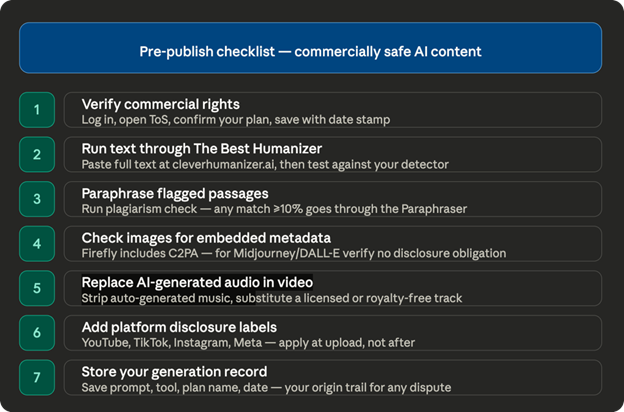
Run through every item on this list before you publish or deliver any AI-generated content for commercial use. Each step maps to one of the risk categories we covered above.
- Verify commercial rights. Log in to the tool you used, open the current terms of service, and confirm that your plan permits commercial use. Screenshot or save the relevant section with a date stamp.
- Run text through a humanizer. Paste the full text into The Best Humanizer at Clever AI Humanizer before delivery or publication. Then test the output against the detector your client or platform uses.
- Paraphrase flagged passages. Run a plagiarism check on the humanized text. Most checkers report similarity as a percentage; a passage at 10% or above against a single source is worth a manual review. Any passage your client’s tool flags goes through the Paraphraser before final delivery.
- Check images for embedded metadata. Adobe Firefly images include C2PA credentials. If you use Midjourney or DALL-E, open the image properties and verify that no platform watermark or tracking metadata creates a disclosure obligation.
- Replace AI-generated audio in video. Strip any audio track generated automatically by a video AI tool and substitute a licensed or royalty-free replacement before you upload.
- Add platform disclosure labels where required. YouTube, TikTok, Instagram, and Meta now display AI disclosure labels on video and audio content. Apply the label at the upload stage, not after publication.
- Store your generation record. Save the prompt, the tool, the plan name, and the generation date for every asset. If a rights dispute arises, this record establishes the origin trail.
Optimize Content Before Delivery:
For text, the humanize-then-paraphrase sequence is the most time-efficient path to a clean, commercially safe draft. Run both steps before you submit – not after a client flags the content.
Conclusion
It is also important to note that the commercial AI content space moves faster than most legal systems can track. Platforms update their terms without notice, and court rulings on training data are still in progress. The generate-humanize-verify workflow stays consistent – but the tool terms will not. Review the ToS of any commercial tool once a quarter.
Against the backdrop of a growing number of free AI tools, note that free commercial rights are the exception. Clever AI Humanizer offers them across the AI Writer, The Best Humanizer, and the Paraphraser at no cost.
One adjacent issue to note: AI-generated images sometimes pass the generator’s rights check but still get rejected at the platform level. Stock sites, print-on-demand services, and ad networks each run their own content policies. Always check the destination platform’s rules – separate from the tool’s license.
FAQ
Can I Sell Content I Generate with AI?
Yes, if the tool you used grants commercial rights to your plan. OpenAI (ChatGPT, DALL-E 3) and Clever AI Humanizer permit commercial use, including on free tiers. Adobe Firefly and Midjourney require a paid plan. Jasper requires a paid plan. Free-trial images from Midjourney carry no commercial license – the platform retains ownership of those assets.
Is AI-Generated Text Safe to Publish Without a Revision Pass?
No. Raw AI output contains statistical patterns that detection tools flag as machine-generated. Publishers, ad platforms, and clients increasingly test submissions. Run all AI-generated text through a humanizer before delivery, then verify with the target detection tool.
Who Is the Owner of an AI-Generated Image?
Contractually, you are – if the tool grants commercial rights on your plan. Legally, no jurisdiction currently recognizes AI as an author, so copyright protection does not apply to the raw output. Your ownership comes from the vendor’s terms of service, not from copyright law. This also means you cannot stop others from producing similar images from the same prompt.
Do I Need to Disclose That My Content Is AI-Generated?
For video and audio on social platforms: yes. YouTube, TikTok, Meta, and Instagram now require AI disclosure labels on video and audio content. For text and images in marketing, blog posts, or product pages: no legal disclosure requirement exists in most markets as of 2025, but platform-specific policies vary and often change.
What Is the Safest AI Image Tool for a Small Business?
Adobe Firefly. It trains exclusively on licensed and public-domain content, grants full commercial rights on paid plans, and embeds C2PA metadata in every image. For an online business that cannot absorb a legal dispute, Firefly removes the training-data risk that both Midjourney and DALL-E carry.
What Happens If I Skip the Humanization Step for Client Work?
The client or the client’s platform may flag the content as AI-generated and reject the submission. Some clients include AI detection clauses in their contracts. Even without a contract clause, a failed detection test damages the working relationship. The humanization step takes under two minutes per article – there is no practical reason to skip it.
Find a Home-Based Business to Start-Up >>> Hundreds of Business Listings.